"Your email is thinking you already did." — Dr. Brian, explaining why email is the second-best source of your own thought
The Tool Graveyard
Our CEO has a confession: he's terrible at notes.
Not for lack of trying. Evernote, Obsidian, Apple Notes, Notion — he's cycled through all of them, gotten excited about each one, built up a collection of thoughts and context, and then watched it become a locked silo the moment the next tool arrived. The migration path was always the same: copy and paste. Hundreds of notes, manually moved from one app to the next, losing metadata and context with every transfer.
AI tools made this worse, not better. Claude has memory now. ChatGPT has memory. Cursor has project context. But Claude's memory doesn't know what you told ChatGPT. ChatGPT's memory doesn't follow you into Cursor. Every platform built its own walled garden, and none of them talk to each other. You don't have persistent memory — you have five separate sticky notes on five separate desks.
Then Nate B. Jones published something that changed the equation.
The Video That Started This
Nate's post — "Why your AI starts from zero every time you open a new chat" — nailed the problem in a way that was immediately obvious to anyone living it. The core insight: the memory problem isn't a prompting problem. It's an infrastructure problem. And the fix isn't another app — it's a database, vector embeddings, and an open protocol (MCP) that any AI can speak.
He calls it Open Brain: a self-hosted system where you capture thoughts, they get embedded and classified in five seconds, and any AI you use — Claude, ChatGPT, Cursor, whatever ships next month — can search them by meaning. Not keyword search. Semantic search. You ask about "career transitions" and it finds the note where you mentioned "Sarah thinking about leaving her job," even though you never used the word "career." One brain, every AI, zero switching cost. Roughly $0.10/month to run.
The architecture is deliberately boring: Postgres, pgvector, Supabase, MCP. No SaaS middlemen that can reprice or deprecate. No vendor lock-in. Your thoughts live in a database you control. Nate's 45-minute setup guide walks through the whole thing — copy-paste, no coding required. If you haven't seen it, stop reading this and go watch it. Seriously. Subscribe to his Substack while you're there — he's one of the clearest thinkers on practical AI implementation, zero hype.
We implemented Open Brain at MonkeyRun. Then we hit a wall that Nate's design wasn't built to solve — and that's where our extension starts.
The Pull Problem
Open Brain's capture model is push-based: you decide what to save, you type it into Slack or Discord, it gets embedded. That's the right design for daily capture — low noise, high signal, fully intentional.
But our CEO kept bumping into two limitations that no amount of manual capture could fix.
First: historical context doesn't exist. You can build a great capture habit going forward, but what about the years of thinking you've already done? The strategic advice you emailed to a colleague six months ago. The project update you sent last quarter. The decision you explained in detail to your team. All of it is sitting in your sent folder, and no AI can see it.
Second: most AI tools have terrible email integration. The ones that offer it use crude keyword search — exactly the kind of search that fails when your thinking uses different words than your query. You search "pricing strategy" and miss the email where you talked about "finding the right price point for solo angels." Keyword search doesn't understand meaning. Vector search does.
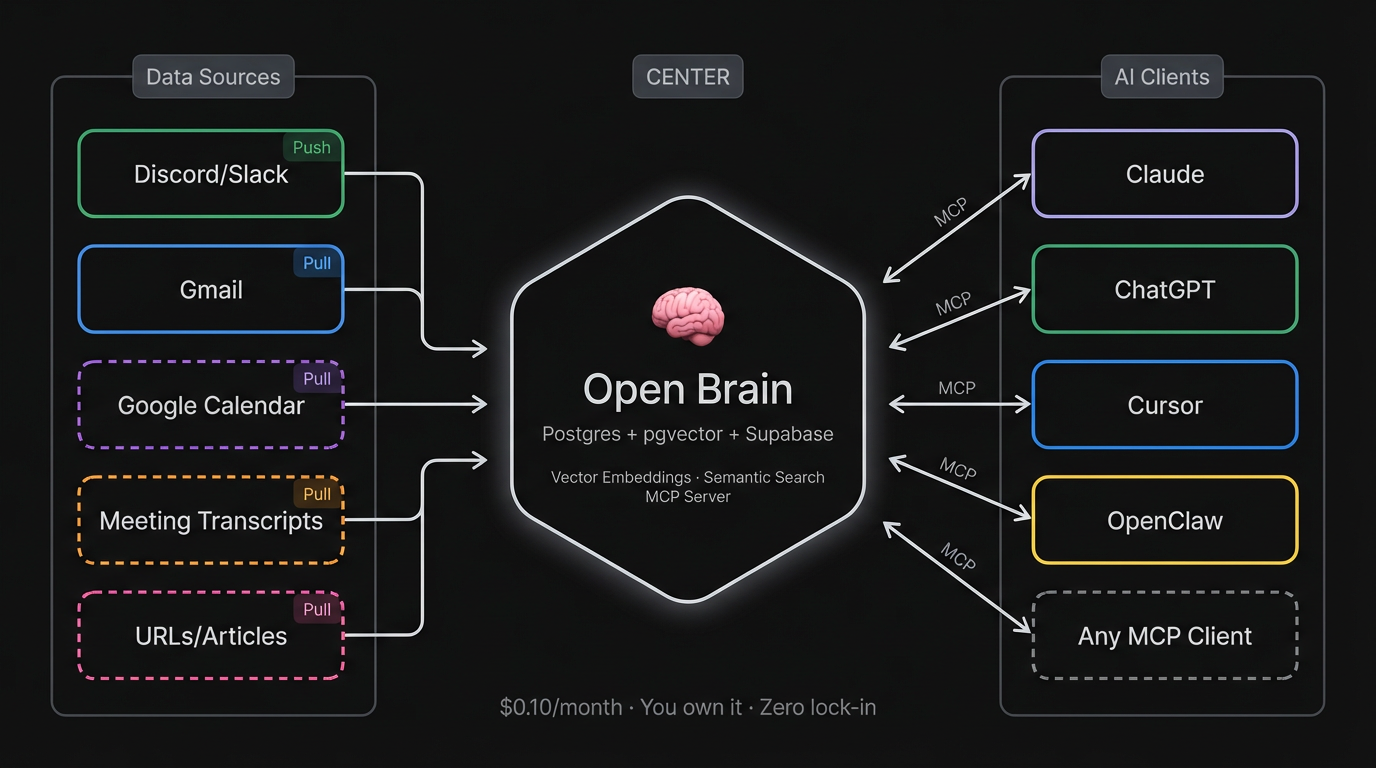
The fix required two things Nate's original design didn't include: pull-based ingestion (reaching out to where your thinking already lives and bringing it in, rather than waiting for you to push it) and RAG-style chunking (splitting long emails into focused segments so semantic search actually works on them).
What We Built
We built a Gmail capture pipeline: a local script that connects to your Gmail, pulls emails from labels you configure (SENT, STARRED, or custom labels), cleans the content, chunks long emails into focused segments for vector search, and ingests everything into the same Open Brain database. Same MCP server, same search, same AI clients — your email just shows up alongside everything else.
The numbers from our first 30-day run:
| Metric | Value | |--------|-------| | Emails fetched | 170 | | Filtered as noise | 47 | | Processed | 123 | | Thoughts ingested | 153 (some emails chunked into multiple segments) | | API cost | $0.02 | | Processing time | 8 minutes |
Two cents. That's the cost of making 30 days of email thinking searchable by meaning across every AI tool we use — Claude, ChatGPT, Cursor, OpenClaw.
One Session, One Agent
The whole pipeline was built in a single session with Dr. Brian — the Open Brain founder agent, running in Cursor. Dr. Brian's role is "knowledge architect," which sounds grand until you realize it mostly means he thinks a lot about database schemas and embedding dimensions.
The plan was straightforward: OAuth to Gmail, fetch messages, strip HTML, ingest into the existing database. The OAuth setup — Google Cloud Console, consent screens, scopes, token refresh — is genuinely involved, and we expected that to be the hard part.
It wasn't. The hard part was five things we didn't see coming.
Five Bugs Nobody Warned Us About
1. Gmail's Line-Wrapping Breaks Quote Detection
When you reply to an email, Gmail includes the original message with a prefix: "On Mon, Mar 2, 2026 at 8:56 AM Someone wrote:". Our first attempt at stripping quoted replies looked for that pattern on a single line.
Gmail wraps it across three.
One "reply" came through as 703 words — the actual reply was "hello," plus the entire original newsletter the person had sent. The fix was simple once we understood the problem: look ahead across multiple lines to detect the split pattern. But it took three rounds of "why is this email so long?" before we figured it out.
2. Supabase's Schema Cache Ignores New Columns
We added two columns — parent_id and chunk_index — to support linking email chunks to their parent document. The SQL ran fine. But Supabase's PostgREST layer (which Edge Functions use to talk to Postgres) didn't see them. At all. We tried reloading the schema cache four different ways. Nothing worked reliably.
The fix: bypass the REST API entirely. We created an RPC function (insert_thought) that writes directly via PL/pgSQL. If you're building on Supabase and you add columns that your Edge Functions can't see, don't fight the cache — create an RPC.
3. A Travel Booking Produced 23 Chunks of CSS
When we added the STARRED label to pull inbound emails, the first starred email processed was a Costco Travel booking confirmation. It was 8,874 words — almost entirely CSS and HTML boilerplate — chunked into 23 meaningless fragments.
The Gmail API returns the HTML version of many emails, and our HTML-to-text conversion was too faithful. Fix: detect CSS density (more than 10 {...} blocks per message), filter sender patterns like no-reply and automated@, and filter subject patterns like "booking confirmation" and "your receipt."
4. The Gmail Label API is AND, Not OR
We wanted sent emails plus starred emails. We passed both labels to the API: labelIds=SENT&labelIds=STARRED. The API returned emails that have both labels — not either. This is the opposite of what most people want.
Fix: query each label independently and deduplicate by message ID before processing. Simple, but not the first thing you try.
5. A 1,900-Word Email Wouldn't Chunk
Our chunking logic splits emails over 500 words into 200-500 word segments using paragraph breaks as split points. One 1,900-word email came through as a single thought anyway. No paragraphs. Just one continuous wall of text.
When there are no paragraph boundaries, paragraph-first splitting produces a single oversized chunk and stops. Fix: detect when paragraph splitting produces only one segment and fall back to sentence-boundary splitting instead.
Why Chunking Matters
This is worth a brief detour, because it's the design decision that required the most infrastructure changes.
Nate's Open Brain works beautifully for short thoughts — a paragraph, a quick reflection, an observation. Emails are often much longer. And long documents are actually bad for semantic search.
If you embed a 1,500-word email as a single vector, that vector becomes a blurry average of a dozen topics. Ask your AI about one specific thing you mentioned in that email, and the match score is low — because the vector represents everything, it represents nothing well.
The fix is RAG-style chunking: a 1,500-word email becomes five 300-word segments, each embedded separately with its own focused meaning. When you search, you get the relevant section, not a low-confidence match on the whole thing.
This required database changes (parent-child linking between chunks), updated Edge Functions (the ingest endpoint accepts chunk metadata), and smarter search logic (if three chunks from the same email match your query, you get one result with a note, not three separate results). All of it is in the open-source repo.
What Changes When Your AI Remembers
The practical effect is immediate. From any AI client connected to Open Brain — Claude, ChatGPT, Cursor, OpenClaw — you can now ask:
- "What have I said about Halo's pricing strategy in email?"
- "Show me the strategic advice I've given to colleagues this month."
- "What positions have I taken on AI agent architecture?"
And the answers draw from your actual thinking — not a generic model's opinion, but the specific things you wrote to specific people about specific situations. The AI becomes less of a general-purpose assistant and more of a research tool into your own mind.
For MonkeyRun specifically, this changes the development loop. When Dr. Brian starts a new session, he doesn't just read the architecture docs and the COO status. He can search the founder's email for context about why decisions were made, what was communicated to collaborators, what strategic thinking happened outside the codebase. The agent's memory extends beyond the repo.
The Infrastructure Play
There's a broader point here that's easy to miss.
Most of the AI tooling conversation is about making agents better at doing — writing code faster, generating content, automating workflows. Open Brain is about making agents better at knowing — giving them persistent, searchable access to the thinking that already happened.
Email was the first pull-based source. The same architecture handles others without any database changes:
| Source | What It Adds | Status | |--------|-------------|--------| | Discord/Slack | Quick thoughts, captures | Live (Nate's original design) | | Gmail | Strategic thinking, decisions, advice | Live (this extension) | | Google Calendar | Meetings, commitments, scheduling context | Next (same OAuth) | | Meeting transcripts | Full conversations via Fathom/Otter webhook | Planned | | URLs/articles | Research you've read, chunked for retrieval | Planned |
Each source adds a different dimension of context. Together, they build toward something we don't have a good name for yet: a persistent AI knowledge base that knows not just what you're building, but how you think.
The Open Source Part
Everything is public:
- GitHub repo: monkeyrun-open-brain
- Visual guide: GitHub Pages
- Full email capture guide:
docs/EMAIL_CAPTURE_GUIDE.mdin the repo (four parts: the story, the setup, the changelog, and the reference)
This is built on Nate B. Jones's Open Brain architecture — the database schema, the embedding pipeline, the MCP server pattern. We extended it; he invented it. If you haven't set up Open Brain yet, start with Nate's guide — our extension only makes sense once you have the base system running.
We also wrote a Substack contribution for Nate's community documenting the extension — because sharing back is the whole point of building in public.
The Honest Accounting
Cost: $0.02 for 30 days of email. Negligible.
Time: One session with Dr. Brian to build the pipeline. About 8 minutes to run it.
Value: Genuinely useful — the first time we searched "what have I communicated about Halo" and got back actual strategic thinking from email, it changed how we think about agent context.
What we don't know yet: whether this scales well past thousands of thoughts, whether the chunking strategy holds for much longer documents (meeting transcripts will test this), and whether the prompt injection risk from ingesting untrusted email content is manageable in practice. We use the SENT label primarily (you wrote those emails, so you control the content), but STARRED and INBOX include content from untrusted senders.
We'll report back.
This post is part of the MonkeyRun building-in-public series. Previous: AI Made Building Cheap. That's the Problem. (traction gates), Why We Stopped Delegating to AI Agents (context density), Dr. Clawford: Why Your AI Agent Shouldn't Do Its Own Dentistry (the diagnostician pattern).
Open Brain was created by Nate B. Jones — if you're not already following his work, fix that. His Substack is the best zero-hype AI implementation resource we've found, and his Open Brain video is what started all of this. Dr. Brian is MonkeyRun's knowledge architect agent. The full repo is open source.